Creative Brainstorming Techniques for Remote Teams
Reclaiming the 'Whiteboard Energy' in a Digital World
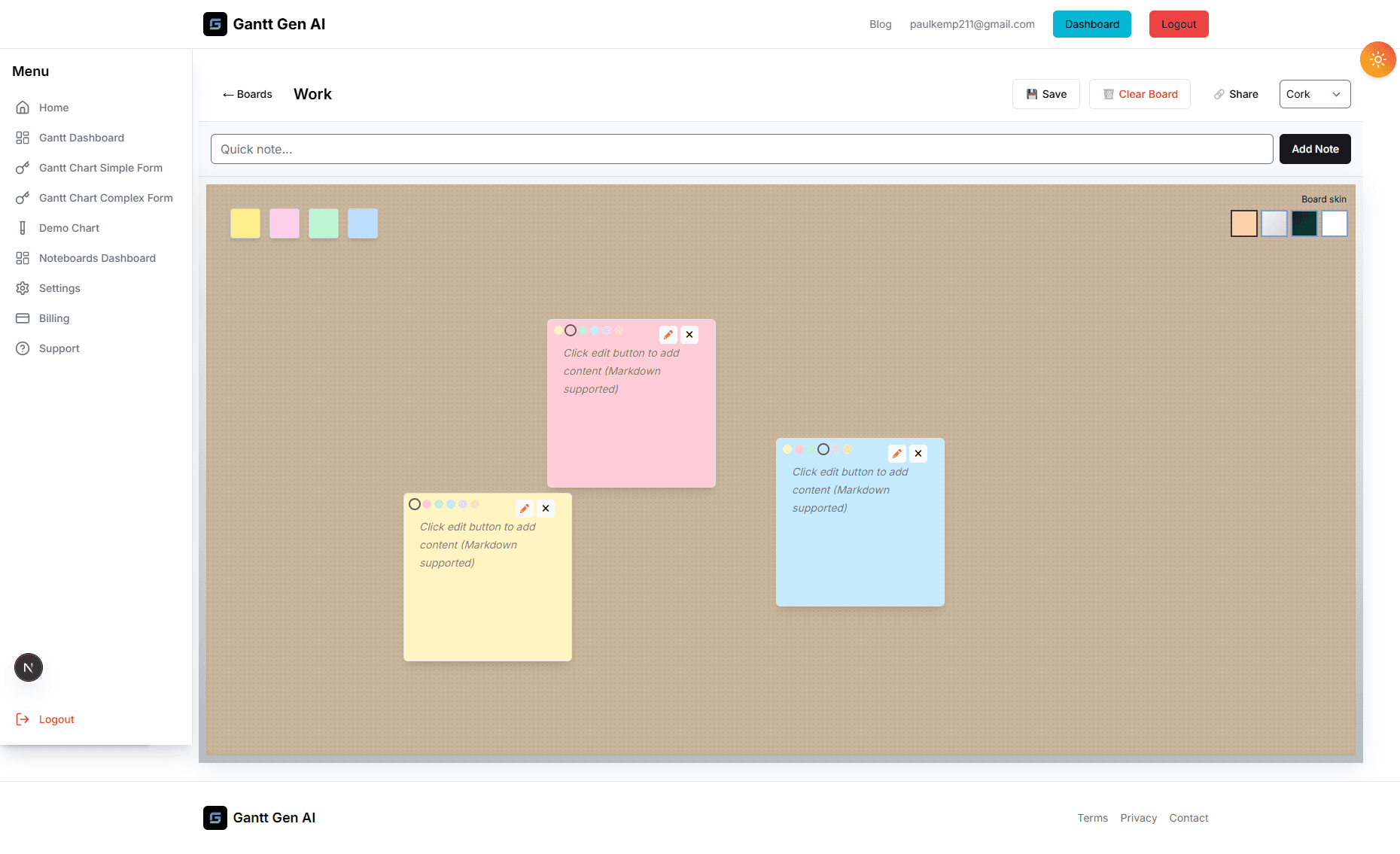
One of the most common complaints about the shift to remote work is the loss of spontaneous collaboration. There's a specific kind of energy that happens when a group of people gathers around a physical whiteboard, markers in hand, and starts building on each other's ideas. In a Zoom-only world, that energy often feels replaced by awkward silences and 'You're on mute'. But it doesn't have to be that way. Our digital Noteboards were built specifically to solve this problem, providing a high-fidelity, real-time space where remote teams can think, create, and innovate together, regardless of their physical location.
However, simply having the tool isn't enough. To truly replicate—and even improve upon—the in-person experience, you need to adapt your brainstorming techniques for the digital medium. Digital brainstorming offers unique advantages, such as anonymity, persistence, and infinite space, that physical whiteboards simply can't match. This post explores several proven techniques for facilitating high-energy, high-output remote ideation sessions using our Noteboard features.
Technique 1: The 'Silent Brainstorm' (Brainwriting)
In traditional meetings, the 'Loudest Voice' often dominates the conversation, leading to 'Groupthink' and a lack of diverse ideas. Remote work often exacerbates this. Digital Noteboards allow for a more democratic approach called 'Brainwriting'. Start your session with 10 minutes of complete silence. Everyone is given a different color of sticky note and told to add as many ideas as possible to the board.
Because everyone is contributing simultaneously, you can generate 5x more ideas in the same amount of time. There is no waiting for someone to finish talking. More importantly, it allows introverted team members to contribute their ideas without the pressure of speaking over someone else. Once the 10 minutes are up, you have a board full of diverse, unfiltered thoughts ready for discussion. It’s the ultimate way to level the playing field and ensure every voice is heard.
Technique 2: Reverse Brainstorming (The 'Project Killer')
Sometimes, we are too close to a project to see its flaws. 'Reverse Brainstorming' is a powerful technique for identifying hidden risks and coming up with innovative solutions. Instead of asking 'How can we make this project succeed?', ask 'How can we make this project fail as spectacularly as possible?'.
Encourage the team to use the Noteboard to list every possible way things could go wrong: 'The server crashes on launch day', 'The user interface is too confusing', 'We run out of budget'. Once the board is full of 'Failure Notes', go through them one by one and flip them. If the risk is 'Confusing UI', the solution is 'Conduct three rounds of usability testing before launch'. This 'Negative-to-Positive' flip is often much more productive than trying to think of 'best practices' from scratch because it focuses on solving real, concrete problems.
Technique 3: The 'Mood Board' and Visual Research
For creative projects, words often fail us. If you're trying to define the 'Vibe' of a new brand or the 'Feel' of a user interface, you need more than just text. Digital Noteboards allow you to pin images, screenshots, and links alongside your notes. Encourage your team to spend a session 'Mood Boarding'. Everyone finds 3-5 images that represent the project's goals and pins them to a shared section.
This visual collage creates a shared language for the project. You might realize that while everyone was saying 'Modern', half the team meant 'Minimalist' and the other half meant 'Futuristic'. Seeing the images side-by-side allows the team to align on a visual direction early, saving hours of unnecessary revision later on. It turns the 'Discovery' phase into a fun, immersive experience that builds team cohesion.
Technique 4: 'Dot Voting' for Rapid Prioritization
Once you have a Noteboard full of ideas, the next challenge is deciding what to focus on. Digital Noteboards make prioritization incredibly fast through 'Dot Voting'. Give every team member a 'budget' of five small icons or specific-colored notes. Tell them to place their 'dots' on the five ideas they think are most important.
In less than two minutes, a heat map of the team's priorities emerges. You can immediately see which ideas have broad support and which ones are outliers. It’s a transparent, fair, and fast way to reach a consensus without endless debating. The ideas with the most 'dots' then become the first tasks you add to your Gantt chart or Kanban board. It’s a direct link from democratic ideation to strategic execution.
Building a Habit of Innovation
The key to successful remote brainstorming is consistency. Don't just save these techniques for 'Big Projects'. Use them for your weekly retrospectives, your monthly planning, and even your casual team-building sessions. By making the Noteboard the center of your team's creative life, you're building a culture that values ideas, collaboration, and continuous improvement. You're proving that 'Whiteboard Energy' isn't about the room you're in; it's about the tools you use and the mindset you bring to them. We can't wait to see the brilliant things your remote team builds on our platform.